EARLIER CHANGES FOR OPENTEXT™ CORE ENDPOINT PROTECTION AGENT

Please choose from the release notes listed below:
- Core 1.9.0.28 (Released April 3rd, 2025)
- Core 1.9.0.27 (Released March 20th, 2025)
- Core build 1.9.0.23 (Released February 26th, 2025)
- Web Threat Shield Portal v2.2.25021.1 (Released January 21st, 2025)
- Windows build 9.0.38.42 (Released December 12th, 2024)
- WRYES Module 1.2.0.2 (Released October 30th, 2024)
- Mac build 9.6.4.87 (Released October 30th, 2024)
- WREDRS Module 1.1.0.11 (Released September 4th, 2024)
- WREDRS Module 1.1.0.9 (Released August 1st, 2024)
- WREDRS Module 1.1.0.2 (Released July 11th, 2024)
- Windows Build 9.0.36.40 (Released July 2nd, 2024)
- Mac build 9.6.3.100 (Released June 20th, 2024)
- Core build 1.7.3.3 (Released June 5th, 2024)
- Core build 1.7.2.2 (Released May 15th, 2024)
- Windows build 9.0.35.17 (Released April 9th, 2024)
- Core build 1.7.0.43 (Released February 20th, 2024)
- SkyCommands Client 1.1.0.7.0 (Released February 14, 2024)
- Mac build 9.5.11.117 (Released November 8th, 2023)
- Core build 1.6.0.38 (Released August 29th, 2023)
- Windows build 9.0.35.12 (Released July 10th, 2023)
- Windows build 9.0.34.54 (Released April 11th, 2023)
- Windows build 9.0.33.39 (Released November 16th, 2022)
- Windows build 9.0.33.35 (Released October 11th, 2022)
- Mac build 9.5.3 (Released September 8th, 2022)
- Mac build 9.5.2 (Released July 18th, 2022)
- Web Threat Shield 2.0.1 (Released July 26th, 2022)
- Windows build 9.0.32.60 (Released June 21st, 2022)
- Web Threat Shield build 2.0.22053.1 (Released May 9, 2022)
- Mac agent build 9.5.1 (Released March 24th, 2022)
- Mac agent build 9.5.0 (Released November 18th, 2021)
- Windows build 9.0.31.84 - October 18th, 2021
- Web Threat Shield Version 2.0.0.2 - October 4th, 2021
- Mac build 9.4.1 - August 11th, 2021
- Mac build 9.3.0 - June 2nd, 2021
- Windows build 9.0.30.75 - April 12th, 2021
- Mac build 9.2.0.95 - April 22nd, 2021
- Windows build 9.0.30.72 - March 22nd, 2021
- Windows build 9.0.30.71 - March 15th, 2021
- Web Threat Shield Edge extension 1.14.21042.1 - March 8th, 2021
- Web Threat Shield Chrome extension 1.14.21042.1 - February 24th, 2021
- Web Threat Shield Edge Chromium extension version 1.12.21022.1 - February 22nd, 2021
- Web Threat Shield Chrome extension build 1.12.21021.1 - January 26th, 2021
- Web Threat Shield Chrome extension build 1.12.21019.1 - January 21st, 2021
- Web Threat Shield Chrome extension build 1.12.20294.1 - November 9th, 2020
- Windows build 9.0.29.62 - October 26th, 2020
- Windows build 9.0.29.52 - October 12th, 2020
- Web Threat Shield Firefox extension 1.12.20265.1 (Released October 6th, 2020)
- Web Threat Shield Edge Chromium extension version 1.12.20261.1 (Released September 22nd, 2020)
- Web Threat Shield Chrome extension build 1.12 - September 16th, 2020
- Windows build 9.0.29.51 - September 2nd, 2020
- Mac build 9.1.3.103 - August 3rd, 2020
- Web Threat Shield build 1.11.0.15 - July 21st, 2020
- Mac build 9.1.2.121 - June 25th, 2020
- Web Threat Shield build 1.11.3.11 - June 24th, 2020
- Web Threat Shield build 1.11.0.12 - May 26th, 2020
- Windows build 9.0.28.48 - May 18th, 2020
- Windows build 9.0.28.39 - April 6th, 2020
- Mac build 9.0.10.174 - February 11th, 2020
- Windows build 9.0.27.64 - January 27th, 2020
- Mac build 9.1.1.66 - January 17, 2020
- Mac build 9.1.1.5 - November 19, 2019
- Windows build 9.0.27.49 - November 11, 2019
- Mac build 9.0.10.90 - October 8, 2019
- Mac build 9.0.10.30 - September 5, 2019
- Windows build 9.0.26.61 - July 16, 2019
- Mac build 9.0.10.22 - June 11, 2019
- Mac Web Threat Shield Version 1.3.0.2 - April 23, 2019
- Windows Web Threat Shield Version 1.9.0.14 - April 3, 2019
- Windows build 9.0.24.49 - February 12, 2019
- Mac build 9.0.9.60 - January 21, 2019
- Windows build 9.0.24.37 - December 4, 2018
- Windows build 9.0.24.34 - October 2, 2018
- Windows build 9.0.23.32 - September 19, 2018
- DNS-Protection build 1.3.0.197 - September 17, 2018
- Windows Web Threat Shield Version 1.8.0.8 - September 4, 2018
- Windows Web Threat Shield Version 1.7.0.23 - August 13, 2018
- Windows build 9.0.21.18 - August 8, 2018
- Mac build 9.0.8.34 - July 30, 2018
- Windows Web Threat Shield Version 1.7.0.19 - July 3, 2018
- Windows build 9.0.20.31 - May 7, 2018
- Windows build 1.7.0.14 - May 2, 2018
- DNS-Protection build 1.2.1.28 - April 12, 2018
- Mac Web Threat Shield Version 1.2.0.148 - March 19, 2018
- Windows Web Threat Shield Version 1.6.0.16 - February 12, 2018
- DNS-Protection build 1.1.0.60 - February 5, 2018
- Windows build 9.0.19.43 - January 29, 2018
- Windows Web Threat Shield build 1.6.0.13 - January 29, 2018
- Mac build 9.0.6.72 - January 17, 2018
- DNS-Protection build 1.1.0.44 - November 28, 2017
- Windows Web Threat Shield build 1.5.0.6 - November 13, 2017
- Windows build 9.0.18.44 - November 9, 2017
- DNS-Protection build 1.1.0.33 - November 7, 2017
- DNS-Protection build 1.0.1.24 - October 9, 2017
- Windows build 9.0.18.34 - October 2, 2017
- Mac build 9.0.5.126 - September 6, 2017
- Windows build 9.0.17.28 - July 17, 2017
- Mac build 9.0.5.56 - June 27, 2017
- Windows Web Threat Shield build 1.4.0.8 - June 20, 2017
- Windows build 9.0.17.24 - June 21, 2017
- Mac Web Threat Shield build 1.2.0.82 - June 19, 2017
- Windows Web Threat Shield build 1.3.0.11 - May 10, 2017
- Windows build 9.0.15.65 - May 10, 2017
- Web Threat Shield build 1.3.17082.1 - April 3, 2017
- Windows build 9.0.15.50 - February 2, 2017
- Windows build 9.0.15.43 - January 30, 2017
- Web Threat Shield build 1.2.0.73 - January 25, 2017
- Web Threat Shield build 1.2.0.69 - December 15, 2016
- Windows build 9.0.13.75 - November 22, 2016
- Windows build 9.0.13.58 - October 21, 2016
- Windows build 9.0.13.50 - October 18, 2016
- Mac build 9.0.4.23 - October 17, 2016
- Windows build 9.0.12.52 - September 27, 2016
- Mac build 9.0.3.39 - September 19, 2016
- Mac build 9.0.2.45 - September 9, 2016
- Windows build 9.0.11.70 - August 22, 2016
- Mac build 9.0.2.42 - August 1, 2016
- Windows build 9.0.10.21 - July 26, 2016
- Windows build 9.0.10.19 - July 12, 2016
- Mac build 9.0.2.22 - June 13, 2016
- Windows build 9.0.9.78 - June 7, 2016
- Windows build 9.0.8.100 - May 16, 2016
- Mac build 9.0.1.31 - May 9, 2016
- Windows build 9.0.8.80 - April 25, 2016
- Mac build 9.0.1.27 - April 11, 2016
- Windows build 9.0.8.72 - March 2, 2016
- Windows build 9.0.8.66 - February 17, 2016
- Mac build 9.0.0.66 - January 20, 2016
- Windows build 9.0.7.46 - January 11, 2016
- Windows build 9.0.7.44 - December 22, 2015
- Windows build 9.0.7.42 - December 16, 2015
- Windows build 9.0.6.14 - November 4, 2015
- Windows build 9.0.5.8 - October 20, 2015
- Mac build 8.0.10.18 - September 28, 2015
- Windows build 9.0.4.7 - September 28, 2015
- Windows build 9.0.3.37 - September 14, 2015
- Windows build 9.0.2.21 - August 24, 2015
- Windows build 9.0.1.35 - July 26, 2015
- Windows build 9.0.0.64 - July 7, 2015
- Mac build 8.0.9.59 - May 27, 2015
- Windows build 8.0.8.88 - May 6, 2015
- Windows build 8.0.8.76 - April 8, 2015
- Windows build 8.0.8.53 - March 23, 2015
- Windows build 8.0.7.33 - March 3, 2015
- Mac build 8.0.8.38 - February 20, 2015
- Windows build 8.0.7.28 - February 18, 2015
- Mac build 8.0.8.33 - February 15, 2015
- Windows build 8.0.7.26 - January 30, 2015
- Windows build 8.0.6.28 - December 9, 2014
- Windows build 8.0.5.111 - November 21, 2014
- Windows build 8.0.5.109 - November 19, 2014
- Windows build 8.0.5.107 - November 7, 2014
- Mac build 8.0.6.105 - October 27, 2014
- Windows build 8.0.4.136 - October 24, 2014
- Windows build 8.0.4.134 - October 20, 2014
- Windows build 8.0.4.131 - September 26, 2014
- Windows build 8.0.4.123 - September 1, 2014
- Windows build 8.0.4.115 - August 8, 2014
- Windows build 8.0.4.104 - July 14, 2014
- Windows build 8.0.4.84 - June 11, 2014
- Windows build 8.0.4.73 - June 5, 2014
- Windows build 8.0.4.70 - April 11, 2014
- Windows build 8.0.4.68 - March 25, 2014
- Mac build 8.0.6.105 - March 11, 2014
- Windows build 8.0.4.66 - March 6, 2014
- Windows build 8.0.4.63 - February 21, 2014
- Windows build 8.0.4.61 - February 21, 2014
- Windows build 8.0.4.57 - February 12, 2014
- Windows build 8.0.4.46 - January 14, 2014
- Mac build 8.0.5.82 - January 10, 2014
- Windows build 8.0.4.42 - December 3, 2013
- Windows build 8.0.4.27 - November 10, 2013
- Windows build 8.0.4.24 - November 5, 2013
- Windows build 8.0.3.3 - September 26, 2013
- Windows build 8.0.2.174 - August 28, 2013
- Windows build 8.0.2.167 - July 31, 2013
- Windows build 8.0.2.155 - June 18, 2013
- Windows build 8.0.2.147 - May 20, 2013
- Windows build 8.0.2.145 - May 15, 2013
- Windows build 8.0.2.127 - March 27, 2013
- Windows build 8.0.2.118 - February 26, 2013
- Windows build 8.0.2.109 - February 13, 2013
- Windows build 8.0.2.105 - February 12, 2013
- Windows build 8.0.2.98 - February 1, 2013
- Windows build 8.0.2.96 - December 19, 2012
- Windows build 8.0.2.93 - December 18, 2012
- Windows build 8.0.2.79 - December 13, 2012
- Windows build 8.0.2.46- November 15, 2012
- Agent changes between builds 8.0.1.233 and 8.0.2.37 - October 31, 2012
| Core 1.9.0.28 (Released April 3rd, 2025) |
| Updated |
- Issue with Nvidia software installation.
|
| Core 1.9.0.27 (Released March 20th, 2025) |
| Updated |
- Communication protocols to better manage load at times of high load.
|
| Web Threat Shield Portal v2.2.25021.1 (Released Jan 21, 2025) |
| Updated |
- Communication protocols to alleviate performance issues at login.
|
| Web Threat Shield Portal v2.2.25021.1 (Released Jan 21, 2025) |
| Updated |
- Updated Copyright
- Bug fixes
|
| Windows build 9.0.38.42 (Released December 12th, 2024) |
| Fixed |
- The correct MSI version is now displayed in Add/Remove programs.
|
| Updated |
- Hardened proxy alignment with the SkyCommandsClient module.
|
| WRYES Module 1.2.0.2 (Released October 30th, 2024) |
| Updated |
- Additional threat telemetry for detections.
|
| Mac build 9.6.4.87 (Released October 30th, 2024) |
| Updates |
- Implements ability to isolate and unisolate a macOS system from the network via agent commands.
|
| WREDRS Module 1.1.0.11 (Released September 4th, 2024) |
| Updated |
- Added support for servers.
|
| WREDRS Module 1.1.0.9 (Released August 1st, 2024) |
| Fixed |
- Resolved BSOD issue in 1.1.0.2
|
| WREDRS Module 1.1.0.2 (Released July 11th, 2024) |
| Updates |
- Transmits additional process data to the cloud.
- Implements ability to isolate and un-isolate a Windows system from the network via agent commands.
|
| Windows Build 9.0.36.40 (Released July 2nd, 2024) |
| Updated |
- Hash enhancements to improve performance.
- Update Copyright to reflect Open Text as legal entity.
- Final build for Windows 7 and Server 2008R2.
|
| Fixed |
- WRSVC service fails to start on Win Server 2022 due to error.
- Quarantined files exist as .dat file which was later detected by WSA.
|
| Mac build 9.6.3.100 (Released June 20th, 2024) |
| Updates |
- Transmits additional process data to the cloud.
|
| Core build 1.7.3.3 (Released June 5th, 2024) |
| Fixed |
- Fix for WRCore update issues found in 1.7.0.43 build.
- Unisolate command fails with DNS error.
|
Information about
Core components.
| Core build 1.7.2.2 (Released May 15th, 2024) |
| Fixed |
- Fix for WRCore update issues found in build 1.7.0.43.
|
| Windows Build 9.0.35.17 (Released April 9th, 2024) |
| Fixed |
- CVE-2023-7241 for local privilege escalation.
Additional information is available here. |
| SkyCommands Client 1.1.0.7.0 (Released February 14, 2024) |
| Released |
- SkyCommands is a new OpenText™ Core Endpoint Protection internal capability that expedites agent command delivery and execution.
- Running under the name “WRSkyCommandsClient.exe” on Business systems, the SkyCommands client governs and processes commands so that feedback between OpenText™ Core Endpoint Protection components is cleaner, faster, and more reliable.
- We initially rolled the client out to certain devices on January 24 and increased coverage weekly, achieving 100% saturation on February 14.
|
| Core build 1.7.0.43 (Released February 20th, 2024) |
| Updated |
- Support for future EDR module.
- Module-Based configuration management
- Updated Company name and copyright for Core.Exe.
|
| Fixed |
- Fix for issues related to locking files during compilation.
|
| Mac build 9.5.11.117 (Released November 8th, 2023) |
| Added |
- macOS 14 (Sonoma) support
|
| Updated |
- OpenText identified as copyright owner
|
| Core build 1.6.0.38 (Released August 29th, 2023) |
| Updated |
- Support for future efficacy modules.
- Harden protection for core services.
- Fix for a BSOD reported in the field.
- Harden compatibility with the DNS agent.
|
Information about
Core components
| Windows build 9.0.35.12 (Released July 10th, 2023) |
| Updated |
- Text for terms and conditions information on the installer screen.
- Scan engine to detect the latest threats.
|
| Windows build 9.0.34.54 (Released April 11th, 2023) |
| Updated |
- Microsoft service protection enabled by default
|
| Fixed |
- Agent Commands fixes and enhancements to support new delivery system
|
| Fixed |
- Issue communicating proxy settings between components.
- System crash that can occur at reboot to remove malware.
- System crash that can occur when journaling changes to a file in a network location.
|
| Updated |
- Compliance with Microsoft requirements for anti-malware products.
|
| Fixed |
- Update to incorrect C:\Program location
- Uninstall flag not sent to backend systems
- Phishing Shield state when disabled via Web Threat Shield
- Crash related to shadow copy services
- Agent language not showing correctly in the console
|
| Fixed |
- Fixed a bug where the app crashes after a scan completes when no network connection is available
- Fixed a bug where updates were failing
- Security and reliability improvements
|
| Updated |
- Addressed issue that led to false positive for Apple’s Malware Removal Tool (MRT)
- Fixed an issue where OS version was not updating correctly
- Added agent command to remotely restore file from quarantine on Mac devices
- Added agent command to remotely initiate a full scan on Mac devices
|
| v |
| Updated |
- Updated signing to conform to Microsoft signing requirements.
- Remove support for legacy IE extension.
- The extension for Edge is still supported.
- Incorporate Real-Time Anti-Phishing into wrUrl.dll
- The previous standalone RTAP DLL, wrPhreshPhish.dll, is removed from the system after reboot.
- Fix for issue obtaining console whitelist.
|
| v |
| Updated |
- Hardened malware removal to avoid interference with legitimate applications.
- Compliance with Microsoft requirements for anti-malware products.
|
| Fixed |
- Interference with VPN when OpenText™ Core Endpoint Protection is active.
- Misidentification of Windows 11 systems as Windows 10 systems.
- Duplication issue at OS update for systems installed with “-clone” option.
- Fix for program compatibility issue with respect to managing oplock.
- Fix for program compatibility issue with respect to managing LSP chain.
- Fix for network issues in 9.0.32.59
|
| Web Threat Shield Edge extension 2.0.22053.1 (Released May 9, 2022) |
| Updated |
- Improved information and new OpenText branding on extension settings page.
- Enhanced telemetry.
- Dynamic Real-Time Anti-Phishing for standalone mode.
|
| Agent changes in Web Threat Shield FireFox extension 2.0.22053.1 (Released May 9, 2022) |
| Updated |
- Improved information and new OpenText branding on extension settings page.
- Enhanced telemetry.
- Dynamic Real-Time Anti-Phishing for standalone mode.
|
| Agent changes in Web Threat Shield Chrome extension 2.0.22053.1 (Released May 1, 2022) |
| Updated |
- Improved information and new OpenText branding on extension settings page.
- Enhanced telemetry.
- Dynamic Real-Time Anti-Phishing for standalone mode.
|
Mac build 9.5.1 (Released March 24th, 2022)
| Updated |
- Changed installation file format from DMG to PKG.
- Single PKG installer now auto-detects OS and quietly adjusts installation for older OSes.
- New command line installation script for PKG installer supported by mac team.
- Support for native Apple uninstallation.
|
| Fixed |
- System Optimizer would not execute.
- Subsequent scans taking as long as the initial scan.
|
| Fixed |
- Fixed issue where quick scans were taking the same amount of time as full scans.
- Addressed UI issue where some text was overlapping on the main screen.
|
| Updated |
- UI logo and branding to include OpenText.
- Added agent setting for upcoming feature to enable blocking read, write and execute to USB attached storage via policy.
|
| Fixed |
- Additional fix for issue where Chrome does not load with the Identity Shield enabled.
- Bug fixes.
- This is the final build provided for Vista and Server 2008 systems. These systems will not be updated to any later versions.
|
| Updated |
- Improved extension manageability.
- Enhanced Real-time Anti-phishing.
- Support for increased allow list capabilities.
|
| Fixed |
|
| Added |
- Bridging version to support upgrades with future PKG based agent installer.
|
| Fixed |
- Fixes for high memory consumption during scans.
|
| Improved |
|
| Fixed |
- Service issue that leads to 1067 error.
|
| Added August 23rd, 2021 |
Components updated to version 1.2.1.43 provide:
- Improvements for update and uninstall.
- Compatibility with latest security features in Intel processors.
|
| Fixed |
- Addressed UI issue where scan progress-bar would occasionally stop while the scan continues in the background.
|
| Added |
- Foundational updates to support switching from a DMG to PKG installer.
|
| Resolved |
- Issue with latest Intel processors.
|
| Updated |
- UI text updated to Allow and Allow List.
- Added entry for Control Active Processes to system tray menu.
|
| Fixed |
- Fix for BSOD with VSS Admin.
- Fix for issue where Chrome does not load with Identity Shield enabled.
- Additional fixes coming in 9.0.31.x for those systems where Chrome issues persist with 9.0.30.71, 9.0.30.72, and 9.0.30.75.
- Bug Fixes.
|
| Updated |
- Support for Realtime Anti-Phishing in standalone mode.
- Removal of legacy JQuery and Permissions requirements.
- Reduced/optimized memory/CPU consumption.
|
| Fixed |
|
| Updated |
- Support for Realtime Anti-Phishing in standalone mode.
- Removal of legacy JQuery and Permissions requirements.
- Reduced/optimized memory/CPU consumption.
|
| Fixed |
|
| Fixed |
- Fix for Search Result Annotation issue with Google searches.
|
| Fixed |
- Fix for Search Result Annotation issue with Google searches.
|
| Fixed |
- Fix for Search Result Annotation issue with Google searches.
|
| Fixed |
|
| Added |
- A checkbox on the options page to suppress (“Do not show again”) the prompt for license in the standalone version.
- Continued checks for integrated mode beyond the current one week.
|
| Fixed |
- Improved uninstall for managed endpoints.
|
| Added March 16th, 2021 |
- This release builds on the previous releases to prepare for our newest Evasion Shield, Foreign Code Shield. Foreign Code Shield uses advanced techniques to detect and block offending PE files from executing and place them in quarantine.
- This release also includes a Metrics module that collects more information from the endpoint. CPU and Memory utilization are examples of metrics that are now collected.
- Files will be added in these locations with version 1.2.1.24 as seen on the file properties:
C:\ProgramData\WRCore\SkyClient\DB
C:\ProgramData\WRCore\CoreService
C:\Program Files\Webroot\Components
C:\Program Files\Webroot\Core
4 processes will run:
1x WRCoreService.x64.exe
1x WRSkyClient.x64.exe
2x WRSvcHost.x64.exe (FCS and Metrics service hosts)
Note: 32-bit systems have their own 32-bit versions of these files
|
| Web Threat Shield Firefox extension 1.12.20265.1 (Released October 6th, 2020) |
| Fixed |
- Resolved an issue with the display of search annotation tooltips for searches at search.yahoo.com.
|
| Added |
- Support for iFrame blocking.
|
| Updated |
- Changed the name of the extension from "OpenText™ Core Endpoint Protection Filtering Extension" to "Web Threat Shield".
|
| Fixed |
- Issue with display of search annotation tooltips for searches at search.yahoo.com
|
| Added |
- Support for iframe blocking
|
| Added |
- Support for integrated chrome extension
|
| Fixed |
- Compatibility issue with MalwareBytes Anti-Exploit and Internet Explorer.
- Possible agent crash at time of shutdown
|
| Added |
- Componentinstall.log and ComponentUninstall.log for new MSI installed components. These files will be in %programdata%\WRData.
- Files in the following locations have been updated (now v1.1):
C:\ProgramData\WRCore\CoreService
C:\ProgramData\WRCore\SkyClient\DB
C:\Program Files\Webroot\Components
C:\Program Files\Webroot\Core
C:\Program Files\Webroot\Core\WRCore.x64.sys (previously in C:\Windows\System32\drivers)
Updated versions (v1.1) of the following processes will run:
WRCoreService.x64.exe
WRSkyClient.x64.exe
A new file will be placed in:
C:\ProgramData\WRCore\CoreService\Components\FCS\WRFCSUser.x86(.x64).dll
|
| Fixed |
- Fixed uninstall link on the WSA About section
- Corrected the intermittent upgrade problem
- Other minor bug fixes
|
| Added |
- Move from Kernel extension to Apple's new Endpoint security API to support upcoming MAC OS changes.
|
| Fixed |
- Fix for repeated FDA dialog
|
| Fixed |
- Issue with keycode prompt when setting to never remember history is applied
|
| Fixed |
|
| Added |
- Auto install for Edge Chromium extension
- Extension install support for Firefox v74+
|
| Added |
- Enhancements to facilitate additional threat detection
|
| Added April 29th 2020 |
- New files added in these locations:
- C:\ProgramData\WRCore\CoreService
- C:\ProgramData\WRCore\SkyClient\DB
- C:\ProgramFiles\Webroot\Components
- C:\Program Files\Webroot\Core
- C:\Windows\System32\drivers(WRCore.x64.sys
- Two new processes run:
- WRCoreService.x64.exe
- WRSkyClient.x64.exe
Note: 32 bit systems have their own 32 bit versions of these files |
| Fixed |
- Fixes an issue with silent deployment on macOS Catalina
|
| Added |
- Features released in the previous build 9.0.27.49
|
| Fixed |
- Issues with network connectivity to devices like Canon printers and online games
|
| Fixed |
- Fixed an issue that prevented WRAgentData.plist from being updated reliably on macOS Catalina
|
| Added |
- Added support for macOS Catalina.
- Please note that Full Disk Access (FDA) must be enabled for our application to function properly.
|
| Known Issues |
- Web Threat Shield is no longer automatically installed. We are working on a solution to enable you to download directly from the browser extension gallery.
- The right-click context menu has been removed on Catalina.
- When launching OpenText™ Core Endpoint Protection on macOS Catalina, the UI may not open automatically. Please open the UI from the system tray icon.
|
| Added |
- Efficacy enhancements
- Driver performance enhancements
- Additional handling for detection and remediation of malware in IMG or ISO files
|
| Fixed |
- Fix to properly honor proxy settings applied at install or via the UI
- Fix to improve performance of script scanning to prevent performance issues
- Fix for loss of network in Sever 2003
|
| Enhancement |
- OpenText™ Core Endpoint Protection for macOS Catalina
|
| Added |
- Additional changes to support the ELAM (Early Launch Anti-Malware) driver.
- A new DLL called “WRSkyClientConnect.x86.dll” is placed in the Program File directory along with WRSA.exe. When enabled, this DLL will manage Sky traffic from endpoint components including the WSA agent
- Further work to support an up-coming efficacy feature.
|
| Fixed |
- Address scenario where a process could be monitored even when it has a 'Good' determination.
|
| Enhanced |
- Compatibility with Mac OS 10.14.5
- Efficacy improvement for archive files
|
| Enhanced |
- Webfilter service network communication improvements.
|
| Added |
- Allow network isolation for UWP (Firewall rule for 127.0.0.1).
- New rule from hotfix to all extension's default rules.
- Real Time Anti-Phishing look ups only happen with the configuration set.
|
| Fixed |
- Issue launching applications from network share.
- Issue with Citrix network printing.
- System performance degradation.
|
| Added |
- Support for ELAM (Early Launch AntiMalware) Driver.
- Registry value to log agent command status to WRlog.
- Support for future Windows 10 update.
- Refactored code in parts of UI.
- Support for future Windows 10 update.
|
| Fixed |
- Case where WRSVC is set to "Take no action" under recovery in service properties.
- False Positive Detection on Storage Craft backup program.
- Issue in 9.0.23.32 where applications accessed through a network share drive become slow or unresponsive.
- Under certain conditions, WSA will delete files when the logged in user does not have permission to do so.
- Add mandatory upgrade field to SecurityProductInformation.ini as per Microsoft requirement.
- User Access Control prompt appearance after updating.
- Improved management of Windows resources.
- GDI issues that resulted in screen tearing.
- Case where Web Threat Shield plugin does not get loaded on WSA install.
- In certain circumstances, an error response from OpenText™ Core Endpoint Protection cloud can cause communications to stop until a reboot is performed.
- Case where shutting down OpenText™ Core Endpoint Protection in a very short space of time after starting it causes shutdown to fail.
- Windows Time format changed after threat detected by learning scan at installation.
- Case where WSA did not always install on Windows XP.
- Ensure complete removal during un-install.
- Copyright year in WRusrl.dll is now correct.
- Reliability of registry scanning.
- Issue when uninstalling OpenText™ Core Endpoint Protection, OpenText™ Core DNS Protection is not uninstalled.
- Mismatched MD5 report can be produced.
- A zero length file is produced when WSA creates a crash dump.
- Case where Restore from Quarantine fails.
- OpenText™ Core Endpoint Protection does not always shutdown correctly.
- Fixed issue with XP and Server 2003 networking found in 9.0.24.28
|
| Fixed |
- Issue where applications launched from a server share load slowly.
|
| Added |
- Regular key that causes executed agent command status to be added to WRlog.
- Support for Windows 10 RS5 update.
- Refactored code in parts of UI.
|
| Fixed |
- WSA did not always install on Windows XP.
- Add mandatory upgrade field to SecurityProductInformation.ini as per Microsoft requirement
- Avoid User Access Control prompt appearing after updating.
- Improved management of Windows resources.
- Web Threat Shield User Plugin would not load on WSA install.
- Error response from OpenText™ Core Endpoint Protection cloud that caused communication to stop until a reboot was performed.
- Shutting down WSA in a short time after starting it caused the shutdown to fail.
- Windows Time format changed after threat detected by learning scan at installation
- Ensure complete removal during un-install.
- Copyright year win WRusrl.dll was not correct.
- WSA did not always shutdown correctly.
- Restore from Quarantine fails when there are lots of threats.
- A zero length file is produced when WSA creates a crash dump.
- Mismatched MD5 report can be produced.
- Improve reliability of registry scanning.
|
| Added |
- Support for policy enforcement while on IPv6 network for roaming users.
- Enhanced logging via WPP allows to log FULL debug info without impacting DNS-P agent performance.
|
| Fixed |
- Fixes the caching issue seen with previous (1.2) agent.
|
| Fixed |
- Removed Firefox package for version 48 and older.
|
| Fixed |
- Support for Windows 10 RS5 update.
- Support for Firefox version 62.
|
| Added |
- New Script detection and remediation feature for obfuscated files.
- Changes needed to support upcoming features in Windows 10 RS4 / RS5.
- Library update used with SHA-256 operations.
|
| Fixed |
- WSA execution errors on Windows 10(bootcamp), Server 2012/2016.
- Improved resource management.
- Fixed WSA crash on updating configuration during exit.
- Fixed False Positive Rootkits Win10(OpenText™ Core Endpoint Protection detects Windows 10 services - Windows Apps).
- Fixed issue with System Analyzer hanging on launch.
|
| Added |
- Poll interval for the Business Mac agent can now be managed via policy.
- New setting "Automatically scan removable media" available under Advanced Settings > Scan Settings.
- New setting "Operate background functions using fewer CPU resources" available under Advanced Settings > General.
- On demand scanning for files and folders through right click context menu.
- If System Integrity Protection is disabled provide a warning message.
- If GateKeeper is disabled provide a warning message.
- Performance improvements.
|
| Fixed |
- Kext is now correctly displayed in Finder.
- UI now displays all items in Quarantine after Daemon restart.
- "Reset All" button now correctly resets Enable Scheduled System Optimization to default setting. Settings for frequency and time are also reset.
- Harden the driver's interface to avoid possible vulnerability.
|
| Fixed |
- Fix for crash with Internet Explorer.
|
| Added |
- Script remediation functionality to the Script Shield feature [disabled].
- Flush journal writes to reduce load on Windows.
- Ensure LastPass dlls are present after WSA uninstall then reinstall.
- Conflict with certain internal disk drives results in Windows not shutting down.
- Grabword used by agent is sent back to OpenText™ Core Endpoint Protection.
|
| Fixed |
- Timeout issue with cloud communications on long scans.
- Crash in Windows Server 2003 due to invalid Pointer.
- High CPU usage in Windows Explorer/ Chrome.
- Welcome Screen hangs after 9.0.19 is installed on Intel Sandy Bridge CPU's.
- Installing WSA fails with "Insufficient permissions" error (Win10 on Bootcamp and/or Server 2012 not Bootcamp related).
- WSA fails to un-install on Windows 10 in a certain scenario.
- Netlogon may not start after reboot with Windows 10.
- Terminal server becomes unresponsive (4005).
|
| Improved |
- Reduce overall time to install WSA.
- Removed files from journal once they have been determined as good.
- Prevent excessive journalling and reduce space consumption.
- The time period to keep files in journal has changed to 60 days.
- Compression is no longer used for WSA Installer.
- Virtual Machines start on Windows 10 hosts when WSA is running.
- Uninstall DNS-P agent when either the website has DNS-P disabled or license key is expired.
- No longer allow multiple/consecutive WSA trial installs on the same computer.
- Address increased memory usage when Crypto Prevent is installed.
|
| Fixed |
|
| Improved |
- Toolkit6 Application displays data.
- Safe search icons display correctly in Bing browser.
- Additional Threat Intelligence improvements when using web search engine.
|
| Changed |
- Wrong whitelisting password appends invalid characters to the original blocked URL.
|
| Updated |
- Disabling Web Threat Shield in policy now turns off all features.
- IE8 support on XP restricted to WTS 1.6.0.16.
|
| Fixed |
- Fixes sporadic loss of connectivity seen on DNSP Agent 1.2.0.148 by enhancing NIC monitoring and detection.
|
| Enhanced |
- Additional fine tuning of detection and revert back in environments where Static DNS IPs are used to ensure graceful revert back.
- Enhanced provisioning retry logic once agent is installed.
- **Please Note** This update includes all previously released enhancements from DNSP Agent 1.2.0.148.
|
| Added |
- Intranet and local support for roaming users on VPN.
|
| Improved |
- Network detection to support roaming user network changes.
|
| Upgraded |
- Support for DNS traffic via TCP protocol in addition to UD.
|
| Fixed |
- Fixed crash in Internet Explorer when loading from a file, rather than a URL.
|
| Updated |
- Miscellaneous enhancements to the upgrade process.
- Improved accuracy of detecting virtual adapters and machines.
- Auto re-provision of the Agent upon restart of service.
|
| Updated |
- Microsoft signed executables are trusted locally.
- SHA256 hashes included in PE data upload.
- Support registry Unicode values.
- Improvements to agent upgrade process.
- Reduce occurrence of false positive detection of Windows10 rootkits.
- Restored quarantine files return to original destination.
|
| Fixed |
- ID Shield no longer causes high cpu with Firefox Quantum.
- Do not trigger download of OneDrive files unnecessarily.
|
| Updated |
- Improve detection of Install/Uninstall/update supported browsers.
- Support for Puny code URLs.
- Whitelisting now performed with certain Arabic characters.
|
| Fixed |
- Fixed base64 encoding/decoding for Mozilla based browser extensions.
- Whitelisting URLs with non-latin characters fixed for IE.
- Disable/uninstall driver on WinServer 2016
- Fixes for accessing IMVU.
|
| Updated |
- Revert back DNS settings to secondary DNS or upon uninstall/Stop and when static DNS IP configuration is used in environments.
- Empty Registry key: Fail back to local DNS server was not working on some system.
- Enable dependencies on Windows services.
- Agent hardening and bug fixes.
|
| Updated |
- Improved performance with the use of HTTP Pipeling.
- IP addresses used by DNS-P are whitelisted.
- Supports Firefox ESR.
- Supports Firefox Quantum.
- Port numbers in URLs are respected when during reputation and phishing lookups.
- Further logging details for browser extensions with all logging using UTF8 encoding.
- IE browser extension sends only the required number of communication requests to OpenText™ Core Endpoint Protection during navigation.
- All browser extensions treat URLs with query parameters in the same manner.
- Use originating URLs for file downloads when URL has been whitelisted.
- Prevent bypass of whitelist when port is added to the URL.
|
| Fixed |
- Issues around co-existence with Surfright HitManPro have been resolved.
- Issues around co-existence with Transticket have been resolved.
- Whitelisting no longer fails when special characters are used.
- When AdvancedMD services are used, device performance does not slow down.
- Reads string values from Windows registry correctly.
- Block page is shown correctly for https URLs.
- WTS installation no longer fails if WSA client version is not available.
- Fix for when using Edge browser on Windows 10, whitelisted sites are not always respected.
|
| Fixed |
- Fixes issue with file operations after the Windows 10 Fall Creators Update.
- Resolves an issue where VMWare Workstation (Viewer) 14 displays an error after updating to Windows 10 Fall Creators Update.
- Prevents blocking of deletion of sandbox for 3rd party app Sandboxie after updating to Windows 10 Fall Creators Update.
|
| Updated |
- Address mismatch issues being logged in the agent log files causing high CPU usage.
- Additional tracing and logging to assist us in troubleshooting field issues.
|
| Fixed |
- Optimize source and destination IP identification.
|
| Updated |
- Agent will support PCs running Windows OS – 7, 8.1, 10 and Server editions 2012 and 2016.
- Single integrated agent to support network and device protection. Deployed using policy management in Console.
|
| New Features |
- Ability to configure DNS Settings to automatically redirect via client.
- Domain resolution and content filtering by category.
- Automated SSL Certificate installation to support SSL sites blocked by category.
- Support for Roaming WIFI (OpenText™ Core DNS Protection agent while using wifi from a public hotspot, airport, hotel, etc.) including public spots that engage in DNS Hijacking.
- Support for Intranet, VPN, Internal DNS Forwarders.
- Fail back option to resolution of the domain and uniterrupted Internet connectivity if unable to connect to OpenText™ Core Endpoint Protection DNS resolvers.
- Deployed via WSA-B Policy Enablement.
|
| Added |
- Efficacy improvements when making determinations for critical system processes.
- Enabled installation where TLS version is 1.1 or greater.
- Data gathering for phase 1 of malicious scripts shield.
- Extended data set transmitted for use with Machine Learning
- Further optimization of cloud communications.
- Handle /disable command line option correctly.
- Improvements to hash calculation for non-PE files.
- In Product Messaging ( IPM ) displays special characters correctly.
- Select IPMs can trigger re-acceptance of EULA.
- Update WSA copyright message to 2017.
- Support for Windows 10 Fall Creators release.
- Support for Windows 2016 Server.
- Enable installation and removal of DNS-P Agent.
|
| Fixed |
- Integration with Mozilla Firefox no longer causes a browser crash in certain circumstances.
- Internet connectivity is not lost when removing WSA.
- Protect against WSA driver being written to disk with zero-byte file size.
- Prevent agent crash when Backup & Sync is being used.
- Addresses a memory leak resulting in 4005 event on Terminal Servers.
- Ensured plugins are removed smoothly during un-installation.
- Ensured journaling files are always present at the time of WSA installation.
- Send data back for GSM to clear 'Needs Attention' from devices in a timely manner.
- When System Analyzer is running, ensure that files can be restored from Quarantine.
|
| Added |
- macOS 10.13 (High Sierra®) compatibility.
|
| Fixed |
|
| Updated |
- Agent support for policy control.
Note: The complete policy feature will be available later this summer, after the console component is released.
- Web Threat Shield settings.
|
| Fixed |
- FP on Time Machine backups.
- Bug fixes.
|
| Updated |
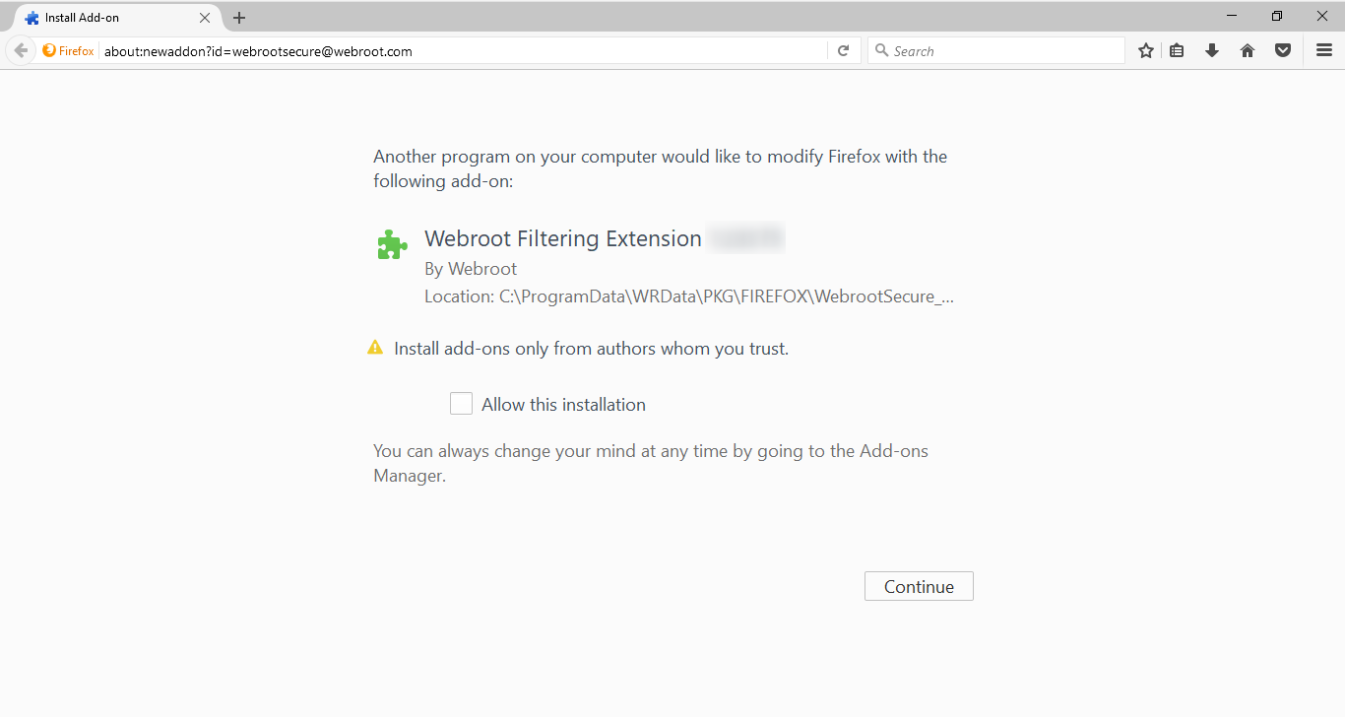
- We’re upgrading our web extensions used with Firefox. This will be a silent update for users with newer versions of Firefox. Users with Firefox version below 48 will be prompted by the browser to approve this change:
- We’ll also be making a variety of improvements to our Search Annotations.
- Based on customer feedback, we’ll reduce risk levels from 5 to 3. (The new categories will be: Trustworthy, Suspicious, and High Risk).
- We will no longer block specific categories (e.g., “proxy”). Instead, we’ll block by reputation only.
- Finally, we will provide clearer reasons for website that are blocked.
|
| Added |
- Ability to uniquely scan files based on the SHA256 hash value to better detect highly targeted MD5 file hash + size clash scenarios.
- Added SHA256 file hash calculation to the agent log files.
|
| Fixed |
- New set of stabilizing patches for 4005 errors and script lock up.
- Bug fixes.
|
OVERVIEW
OpenText™ Core Endpoint Protection already features several protection layers, including the ability to detect and block malicious and known phishing URLs. In an upcoming release, we will be upgrading all Mac endpoint agents for our business customers, at no cost, to latest version of our new Web Threat Shield.
These updates lay important groundwork for Mac policy management and will bring agent functionality across Mac and Windows endpoints into parity.
WHAT TO EXPECT Browser extensions will be released globally, and individual endpoints will be updated as they check in. No action is required on your behalf.
PLEASE NOTIFY YOUR CLIENTS:
They will experience a visible impact. Safari, Chrome, and Firefox will initiate activities that notify end-users of the new extension.
- Chrome will launch a page notifying the user of the new extension. No action required.
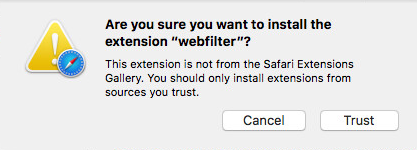
- Safari will request permission to install the update. The user must click “Trust,” or the extension will be disabled.
- Firefox will prompt the user to install the new web extension the next time the user launches the application.
MORE DETAIL
User Experience
When the agent checks in with the console and downloads the update, the user will briefly see a OpenText™ Core Endpoint Protection message indicating the component installation has begun.
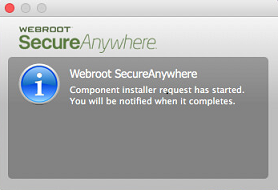
This message should clear itself automatically.
Browser Prompts
The security precautions built in to Mac-specific browsers mean Mac users will receive a prompt to confirm the new web filtering extension. When they receive the update, browsers will automatically initiate this prompt.
Google Chrome
The Chrome message is purely informational. No action necessary. This page can be closed.

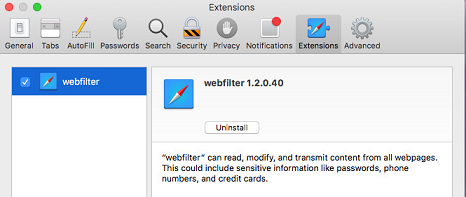
Users must click Trust to install and enable the updated web filtering extensions. If they click Cancel, the extension will be installed, but disabled.
The Extensions window will remain open. Once the user clicks Trust, they can close the Extensions window.
Firefox will download the new web extension silently. Following the update, the first time the user launches the browser, Firefox will prompt them to install the new extension.
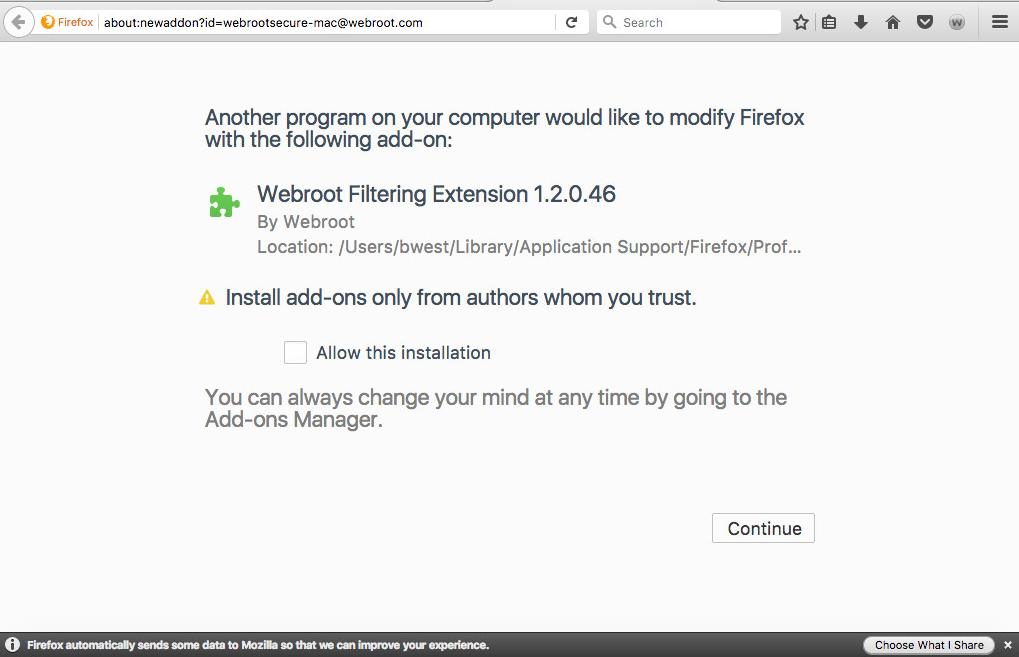
If Firefox is open while the extension is being downloaded, the browser will not prompt the user to install the new extension until the next time they launch Firefox.
OpenText™ Core Endpoint Protection Prompt
Once the component has been installed on all browsers, the OpenText™ Core Endpoint Protection agent will briefly display a message to indicate the update process has completed.
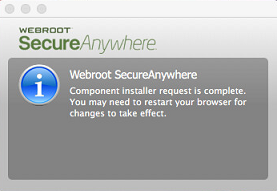
OpenText™ Core Endpoint Protection is now adopting a gradual rollout method for their releases. As such, not everyone will receive the update at the same time. An email will be sent from productupdates@webroot.com to give notice before your endpoints are updated.
| Updated |
- Browser plugin hardening.
|
| Fixed |
|
| Fixed |
- New block page design and styling.
|
Following reports of difficulties installing the latest OpenText™ Core Endpoint Protection update v9.0.15.43, a new agent release titled v9.0.15.50 has been deployed automatically to all of our OpenText™ Core Endpoint Protection customers on Thurs 2nd Feb 2017. This version provides relief to those customers experiencing installation problems.
OpenText™ Core Endpoint Protection apologizes for any inconvenience caused by this updated release. Our 24/7 Support team is briefed and available to customers who may have any questions or concerns about this update.
When we release a version update, it is load balanced across our global user base. As such, it can take up to 72 hours to apply to all endpoints.
Build 9.0.15.43 introduces changes to the endpoint identification system so that Amazon WorkSpaces instances are correctly identified as virtual machines.
- If you have agents that are installed on Amazon WorkSpaces instances, and if the initial installation of the OpenText™ Core Endpoint Protection agent used the “-clone” switch, you may notice duplicate entries for each endpoint. If you observe duplicates, please open a ticket with Support, and these duplications will be fixed.
-
If the initial installation of the OpenText™ Core Endpoint Protection agent did not use the “-clone” switch, then your console view will be updated to reflect the correct number of endpoints installed to Amazon WorkSpaces instances.
-
If you do not have OpenText™ Core Endpoint Protection agents installed on an Amazon WorkSpaces environment, you should not notice any changes.
In addition, this build has the following updates:
- Correctly align console state to reflect agent state.
- Additional changes to address 4005 error and script lock up.
- Identify Amazon Workspace instances as virtual machines.
- Bug fixes.
- Update copyright date.
Please raise a Support ticket if you have questions or concerns about these changes.
When we release a version update, it is load balanced across our global user base. As such, it can take up to 72 hours to apply to all endpoints.
When we release a version update, it is load balanced across our global user base. As such, it can take up to 72 hours to apply to all endpoints.
Overview of known issue
From Thursday, December 15 2016 OpenText™ Core Endpoint Protection will roll out a new Web Threat Shield plugin, version 1.2.0.69. to address a known defect.
This release addresses a sporadically occurring defect in which OpenText™ Web Threat Shield binaries were repeatedly marked to be deleted with the next Operating System restart. In some cases this caused installers/uninstallers to function incorrectly.
OpenText™ Core Endpoint Protection Release Plan
- OpenText™ Core Endpoint Protection will deploy v1.2.0.69 of the plugin from December 15 2016.
- Installation will occur silently if automatic updates are enforced for your OpenText™ Core Endpoint Protection deployment.
- A restart of the machine is required to complete deployment
Note: OpenText™ Core Endpoint Protection agents will receive the updated plugin on their defined poll interval. Agents can be forced to obtain the plugin immediately by:
OpenText™ Core Endpoint Protection apologizes for any inconvenience caused by this defect. Please contact Support if you continue to see installer/uninstaller errors following successful deployment of this plugin.
When we release a version update, it is load balanced across our global user base. As such, it can take up to 72 hours to apply to all endpoints.
When we release a version update, it is load balanced across our global user base. As such, it can take up to 72 hours to apply to all endpoints.
| Implemented |
- New set of stabilizing patches for 4005 error and script lock up.
|
When we release a version update, it is load balanced across our global user base. As such, it can take up to 72 hours to apply to all endpoints.
| Improved |
|
| Fixed |
- BSOD with Microsoft wireless keyboards.
- 4005 winlogon error.
- Bug fixes.
|
| Updated |
- Hardened agent cloud communication.
|
| Added |
- New agent commands available from the console.
|
| Implemented |
- A command line method to force agent check-in to the cloud.
|
When we release a version update, it is load balanced across our global user base. As such, it can take up to 72 hours to apply to all endpoints.
When we release a version update, it is load balanced across our global user base. As such, it can take up to 72 hours to apply to all endpoints.
| Updated |
- Support for installation on macOS 10.12 (Sierra®). Only installers version 9.0.3.39 and higher will support installation to Sierra®.
|
| Fixed |
|
When we release a version update, it is load balanced across our global user base. As such, it can take up to 72 hours to apply to all endpoints.
| Updated |
- Ensure update capability on macOS 10.12 (Sierra®). OpenText™ Core Endpoint Protection strongly encourages all OpenText™ Core Endpoint Protection Mac users to update to agent version 9.0.2.45 or higher before updating the OS to Sierra®.
|
When we release a version update, it is load balanced across our global user base. As such, it can take up to 72 hours to apply to all endpoints.
| Improved |
- Remove obsolete databases.
- Bug fixes.
|
When we release a version update, it is load balanced across our global user base. As such, it can take up to 72 hours to apply to all endpoints.
| Enhanced |
- Agent identification system for partners.
|
| Fixed |
|
When we release a version update, it is load balanced across our global user base. As such, it can take up to 72 hours to apply to all endpoints.
| Updated |
- Extend capability to rollout new features.
|
When we release a version update, it is load balanced across our global user base. As such, it can take up to 72 hours to apply to all endpoints.
| Updated |
- Harden uninstall routines.
- Web Filtering is VM aware.
- Enhancement to Threat Intelligence for Web Filtering.
|
| Fixed |
|
When we release a version update, it is load balanced across our global user base. As such, it can take up to 72 hours to apply to all endpoints.
| Fixed |
- Further scan engine improvements.
- Scan performance improvements.
- Bug fixes.
|
When we release a version update, it is load balanced across our global user base. As such, it can take up to 72 hours to apply to all endpoints.
| Enhanced |
|
| Fixed |
- Further scan engine improvements.
- Bug fixes.
|
When we release a version update, it is load balanced across our global user base. As such, it can take up to 72 hours to apply to all endpoints.
| Fixed |
- Further scan engine improvements and efficacy enhancements.
- Bug fixes.
|
When we release a version update, it is load balanced across our global user base. As such, it can take up to 72 hours to apply to all endpoints.
When we release a version update, it is load balanced across our global user base. As such, it can take up to 72 hours to apply to all endpoints.
| Enhanced |
- Implementation of Microsoft Windows 10 user experience requirements.
|
When we release a version update, it is load balanced across our global user base. As such, it can take up to 72 hours to apply to all endpoints.
Introduction
As part of our continuing Mac parity development we are releasing a new Agent build 9.0.1.27 on the 11th of April, which will help us move further towards providing Mac OS parity with our MS Windows endpoint security visibility and management.
- NEW - Enhanced agent data reporting to cloud – Agent status will now be sent up upon the action of one or more triggers.
These triggers will match PC triggers where applicable. The result of this change is that updated agent status values are now sent more regularly, as previously these values were only sent when the UI was opened. (In some business environments that might not happen often, or in some cases ever.)
-
NEW - Enhanced speed of scan start – This simply mean that Mac endpoint scans now start much faster and noticeably so over the current version.
-
UPDATE - Hardened machine identification – In a very few cases the Mac serial was not available in the console. This feature enables an identification to take place and the Mac to be identified.
-
UPDATE - Updated settings text string for clarity – We have changed the text from "Scan for Windows threats” to “Also scan for Windows threats.”
| Changed |
- To conform to Microsoft user experience requirements for Window 10.
|
| Fixed |
|
When we release a version update, it is load balanced across our global user base. As such, it can take up to 72 hours to apply to all endpoints.
| Added |
- Send new Mac data points to the cloud.
- New method for differential feature activation.
- Provide relevant in product messaging after a license swap.
|
| Updated |
- UI enhancement for EULA reacceptance.
- Send real time threat detection reports to the cloud.
|
| Fixed |
|
When we release a version update, it is load balanced across our global user base. As such, it can take up to 72 hours to apply to all endpoints.
When we release a version update, it is load balanced across our global user base. As such, it can take up to 72 hours to apply to all endpoints.
| Added |
- New method for differential feature activation.
- UI enhancement for EULA reacceptance.
|
| Improved |
- Provide relevant in product messaging after a license swap.
- Hardened service start.
|
| Fixed |
|
| Improved |
- Hardened cloud communication.
- Further scan engine improvements.
|
| Implemented |
- UEFI and Secure Boot Compatibility in Windows 10.
- Ensure Edge stability with regards to WSA.
- Improve compatibility with Thomson One 5.0.
|
| Enhancements |
- Update UI for installer screen.
- UI enhancements.
- Added support for OS X 10.11 (El Capitan®).
|
| Fixed |
- Scan engine improvements.
|
| Improved |
- Collect additional scan data.
- Further scan engine improvements.
|
| Fixed |
|
| Updated |
- New, enhanced web filtering system.
|
| Enhanced |
|
| Improved |
- Increased efficacy and stability.
|
| Fixed |
|
| Enhancements |
- Additional support for Edge Browser.
- Efficacy enhancements.
|
| Fixed |
- Scan engine improvements.
- Bug fixes.
|
| Added |
- Agent support for advanced overrides.
- UI for installer screen.
|
| Fixed |
|
To be compatible with the release of Windows 10, we are releasing our OpenText™ Core Endpoint Protection 9.0 version. Should you be considering upgrading to Windows 10, we would strongly recommend updating your OpenText™ Core Endpoint Protection version to our 9.0 release if you do not have automatic updating in place. This will ensure that when Windows 10 is released on July 29th, your security will be compatible with the upgrade.
| Implemented |
- Correct OS version reporting for Windows versions 8.1 and above.
- Windows 10 compatibility.
|
| Improved |
- Path normalization for Internet Explorer cache paths.
- Further scan engine improvements.
- Aligned agent states.
|
| Fixed |
|
| Added |
- New agent status data value.
- Aligned agent states.
|
| Updated |
|
| Fixed |
- Fixed crash with Windows 10.
|
| Changed |
- Modified state and messaging for expiring business PC endpoints.
|
| Added |
- Immediate remediation when the policy setting "Automatically block files when detected on execution" is used.
|
| Enhanced |
- Cloud detection logic.
- Detection and remediation of malware running in memory.
|
| Fixed |
- Harden rollback routines.
|
| Fixed |
- False positive detection.
- Hardened license key obfuscation for business customers.
|
| Improved |
- Hardened settings persistence.
- Further scan engine improvements.
|
| Added |
- ZIP file scanning.
- Hide license key by default for business customers.
|
| Improved |
- Performance of scanning with advanced detection routines.
- Compatibility with JAMF Casper software.
|
| Changed |
- Updated copyright date in UI.
|
| Fixed |
- Suppress erroneous browser extension installation message.
- Two crash reports.
|
| Added |
- Additional PE data points.
- Streamlined build configurations for specific partners.
|
| Updated |
- System Analyzer for Business.
- Copyright date in UI.
- Further scan engine improvements.
|
| Fixed |
- Scan issue over very large files.
- Issue with URL handling in Chrome.
|
| Added |
- Support for new web filtering rollout.
|
| Updated |
- User Interface for tray messages.
- Further scan engine improvements.
|
| Enhanced |
- Journaling and rollback for very large change journals.
- Console data set.
|
| Improved |
- LSP chain repair during remediation.
|
| Fixed |
- Conflict with Kaseya remote keyboard.
|
| Improved |
- Compatibility with 64 bit Internet Explorer on Windows 8 systems.
|
| Updated |
- Further scan engine improvements.
|
| Updated |
- Further scan engine improvements.
|
| Added |
- Support for OS X 10.10 (Yosemite®).
- System Optimizer for Mac (Consumer Only).
|
| Improved |
- Detection of Phishing sites.
- Installation process to be simpler and more intuitive.
|
| Updated |
- Further scan engine improvements.
|
| Updated |
- Further scan engine improvements.
|
| Updated |
- Further scan engine improvements.
|
| Fixed |
- False positive on Kaspersky Internet Security 2015.
|
| Updated |
- Further scan engine improvements.
|
| Fixed |
- Issues with scans not starting.
- Temp folder being deleted by System Optimizer.
- Novell NSS shares scanning.
|
| Added |
- Proxy bypass key functionality.
- Active threats registry key.
|
| Fixed |
|
| Improved |
- Modified time display to allow for renewal processing.
- Further scan engine improvements.
|
| Improved |
- Further scan engine improvements.
|
| Fixed |
- Scanning over certain network configurations.
- Hardware compatibility with Dell Vostro.
|
| Added |
- Logic to allow Chrome components’ recent updates.
|
| Improved |
- Further scan engine improvements.
|
| Implemented |
- Browser support for Web Filtering for Chrome and Firefox.
- New engine detection capabilities.
|
| Improved |
- Various bug fixes to improve consistency, performance, and stability.
|
| Improved |
- Further scan engine improvements.
|
| Improved |
- Further scan engine improvements.
|
| Fixed |
- Compatibility with Hyland Software applications.
- Compatibility with some instances of Google Chrome.
- Warning about some Citrix components
|
| Improved |
- Stability when analyzing system changes.
- Text layout for some localized environments.
- Proactive Cryptolocker blocking
|
| Fixed |
- Minor UI issues with Backup & Sync.
- Handling deactivate commands from the console.
|
| Improved |
- Scanning folders on network drives.
- Detection for the Expiro virus.
- Compatibility with AdBlock.
- Locking keycode changes when centrally managed.
- Generic blocking of threats like Cryptolocker.
|
| Fixed |
- Delaying the system shutdown on Windows Server 2003.
- Installing the agent when no user is logged in.
- Reduced the CPU impact of file infector scanning.
|
| Improved |
- Protection against untrusted BHOs.
- Protection against Cryptolocker.
- Generic protection against threats attempting to steal user information.
|
| Fixed |
- Stability and compatibility on some Mac platforms.
|
| Other |
|
| Implemented |
- Automatic cleanup of old rollback data.
- Days remaining under My Account are hidden when the keycode is hidden.
|
| Fixed |
- Updating the language file.
- Password management support in Internet Explorer 11.
- Executing new agent commands sent from Management Console.
|
| Improved |
- CPU usage is reduced during scans.
- Registry reading performance when under high contention.
- Detection of script viruses.
- Speed of uninstallation.
|
| Fixed |
- An issue related to high CPU of the system during the learning scan where WSA was trying to scan some very high-RAM processes for file infectors, which was taking a considerable amount of time due to large amounts of RAM allocated on the systems.
|
| Added |
- Proxy configuration options pre-install.
- Context sensitive help throughout the UI.
- Handling for PUAs.
- Access to Backup & Sync from within Windows Explorer.
- Compatibility with Windows 8.1.
- Hardened the scan progress against active rootkits.
- Hijacked desktop backgrounds are now reset automatically on Windows XP after the cleanup completes.
- Detection for a new set of VBScript threats.
|
| Implemented |
- More than 4,000 improvements throughout the product, significantly enhancing all areas of protection, usability, and the core functionality.
- A fresh new UI which makes important features easily accessible.
- New Realtime Anti-phishing which blocks phishing websites even if they are only seen by a single user.
- New OpenText™ Core Endpoint Protection Infrared which blocks advanced persistent threats with a multi-layer defense engine.
- Simplified configuration options across the product, making it easier to use and set up.
- Automatic adaptive installation custom tailoring OpenText™ Core Endpoint Protection to your system as it installs.
- Improved malware cleanup and detection throughout the product.
- Lighter footprint, reducing memory, CPU, and disk resource requirements.
|
| Fixed |
- Compatibility with other security solutions and third party products.
- UI performance on lower end graphics cards.
- The login screen now shows if the user is deactivated in Backup & Sync.
- Backup settings are retained when logging in as a different user.
- Compatibility with MalwareBytes AntiExploit.
- Minor graphical fixes.
|
| Improved |
- Scanning of locked files.
- Cleanup of active threats to avoid reboots.
|
| Changed |
- “Support/Community” to “Help and Support” for localized languages.
|
| Updated |
- Build number to allow compatibility with Windows 8.1. No other updates.
|
| Added |
- Extended blocking of Shell registry changes to HKU keys.
|
| Improved |
- Stability on Windows 8.1
- Compatibility with receiving network data on Windows 8
- Compatibility with some foreign keystrokes
- Compatibility with certain keyboard configurations
- Compatibility with AuthenTec fingerprint sensors
|
| Fixed |
- Disabling Novell authentication packages during malware cleanup
-
|
| Fixed |
- Potentially dropping the first keystroke on localized platforms.
- A crash when prompting for an email address on installation on localized OSs.
- Compatibility with Google Chrome’s nacl64.exe.
- General RealTime Shield functionality
- Compatibility with the new version of ExploitShield, now part of MalwareBytes.
|
| Added |
- Central management for controlling System Cleaner settings and controls in the online management console.
- Heuristics to detect a new AutoCAD virus.
|
| Improved |
- Performance when installed alongside Citrix environments.
|
| Fixed |
- Compatibility issues with proxy settings during and after installation.
- Incompatibility with ESET’s self-protection on Windows 8.
- Processing detection configuration option when program launches.
- EICAR is now submitted as an executable file to be displayed within the console.
-
|
| Fixed |
- Checking proxy settings when automatically installing on localized OS's.
|
| Added |
- Automatic proxy detection for SME.
|
| Improved |
- Compatibility with F5 VPN
- Application performance on XenApp servers
- Handling of proxy configuration
- Compatibility with DiskDirector
- Malware cleanup of registry threats
- System Analyzer malware detection
- Support for virtual machines and cloned environments
|
| Fixed |
- Removing some detected components of malware on reboot.
- Updating protection statistic values on XP in SME.
- Network-level compatibility on terminal servers.
- Compatibility with Kaseya Agent Internet Access Protection Extension.
- Triggering of multiple scheduled scans.
- Browser compatibility with Sandbox 4.1 beta.
- Instability in certain SME environments.
|
| Added |
- A registry value of type DWORD named NoStatistics under HKCU\Software\WRData which, when set to 1, disables the behavior statistics on the status screen
|
| Improved |
- Agent shutdown speed.
- Behavior logging in Windows Event Logs.
- Identity Shield functionality on Windows Server 2008.
- Kernel keylogger protection.
- Migration process for Prevx users to OpenText™ Core Endpoint Protection.
|
| Fixed |
- An issue with changed settings and local database data on shutdown
- Compatiblity with Jeeves GARP software
- Identifying cloud managed configuration settings
|
| Other |
|
| Improved |
- Performance on Windows XP
- General System Cleaner functionality
- General System Analyzer functionality
- General RealTime Shield functionality
|
| Other Changes |
|
| Improved |
- Compatibility with new Windows XP changes.
|
| Improved |
- Cleanup of ZeroAccess.
- Compatibility with the following 3rd party applications:
- Adguard Ads Blocker
- CycleServer
- Google Video Chat
- Instant Text 7 Pro
- Keyboard Express
- RoboForm2Go
- ShortKeys
- General compatibility with hotkey applications.
- Identity Shield behavior.
- Keylogging protection.
- Padlock icon behavior.
- Scan functionality.
- Scan reporting.
|
| Fixed |
- Issue using Alt+D in Opera with the Identity Shield enabled.
- Keystroke entry issues on some localized keyboards.
|
| Other Changes |
|
| Improved |
- Compatibility with OmniPass password management software.
- Identity Shield behavior.
|
| Fixed |
|
| Improved |
- System performance and reduced background overhead of OpenText™ Core Endpoint Protection.
|
| Fixed |
- Issue with unnecessary Firewall prompts.
|
| Improved |
- Identity Protection compatibility with Firefox.
- Keylogger protection on Windows 8.
- Scan functionality.
|
| Fixed |
- Compatibility with Google Toolbar.
- System Cleaner issue with Pegasus Email configuration files.
- Issue with "Scan with OpenText™ Core Endpoint Protection" and "Permanently Erase with OpenText™ Core Endpoint Protection" context menu options.
|
| Other Changes |
- Changed Identity Shield padlock back to yellow for visual impairment compliance. OpenText™ Core Endpoint Protection still protects HTTP sites as well as HTTPS.
|
| Added |
- Additional logic to address Zero Day threats.
|
| Improved |
- Citrix XenApp support.
- Citrix XenDesktop support.
- Compatiblity with Citrix VDA (Virtual Desktop Agent).
- Firewall prompting in SME environments.
- Filename normalization.
- Handling of active threats.
- Handling of applications running from servers.
- Handling of DLL scanning on network shares.
- Identity Shield functionality.
- Installation functionality.
- Protection against information stealing threats.
- Protection against malicious BHOs injected into the browser.
- Recycle Bin name resolving.
- Scan functionality.
|
| Fixed |
- Login issue on Windows 8 systems.
- Firefox support in Windows 8 with Identity Shield.
- Handling user account switching.
- Update handling.
|
| Other Changes |
- Changed Identity Shield padlock to green.
OpenText™ Core Endpoint Protection now protects HTTP sites as well as HTTPS
- Minor UI changes.
|
| Added |
- Support for new Identity Shield installation functionality
|
| Improved |
- Firewall administration from the Management Console.
- Scheduled scanning when no users are logged in.
|
| Added |
- Additional license logic around Identity Shield and Firewall capabilities.
- More than 6,000 changes across the product.
- New user experience, scan screens, and pre-install process.
- New trial license key procedure.
- More granular control over system cleaner scheduling.
- Zero Day Shield, USB Shield, and Offline Shield for additional layered protection.
|
| Improved |
- Infected system file repair.
- Terminal Server support.
- Ease of use and simplified configuration options.
- Antimalware engine improvements to block remote code exploits.
- Handling of digital certificates.
- Handling of terminated scans.
- Reduced UI overhead on slower processors.
- Resolving of cache paths.
- Status reporting.
- Trial build installation experience.
- Dramatically reduced system performance overhead.
- Significant cleanup improvements throughout.
- Significant efficacy improvements.
- Windows 8 Support.
- Compatibility with other security solutions.
- System Cleaner strength and identified applications.
|
| Fixed |
- Several fixes from customer reports.
- Improved stability overall.
|
